KOOSMILE / Kooforway 8" Intel N150 convertible mini laptop — Linux review & fixes
In-depth Linux review, firmware analysis and working fixes for the 8-inch Intel N150 2-in-1 mini laptop sold as KOOSMILE and KOOFORWAY (family "P8"; earlier N100 units sold as Topton, Crelander, Aslay). Covers the broken ACPI/DPTF fan code and its fix, tablet-mode switch, screen rotation of the portrait DSI panel, battery gauge placeholders, thermal throttling, and why an ARM SoC would have served this chassis better.
This page mirrors the README of the companion repository — browse the fixes, scripts and ACPI table dumps there.
A lovely little convertible, wrapped around firmware nobody finished
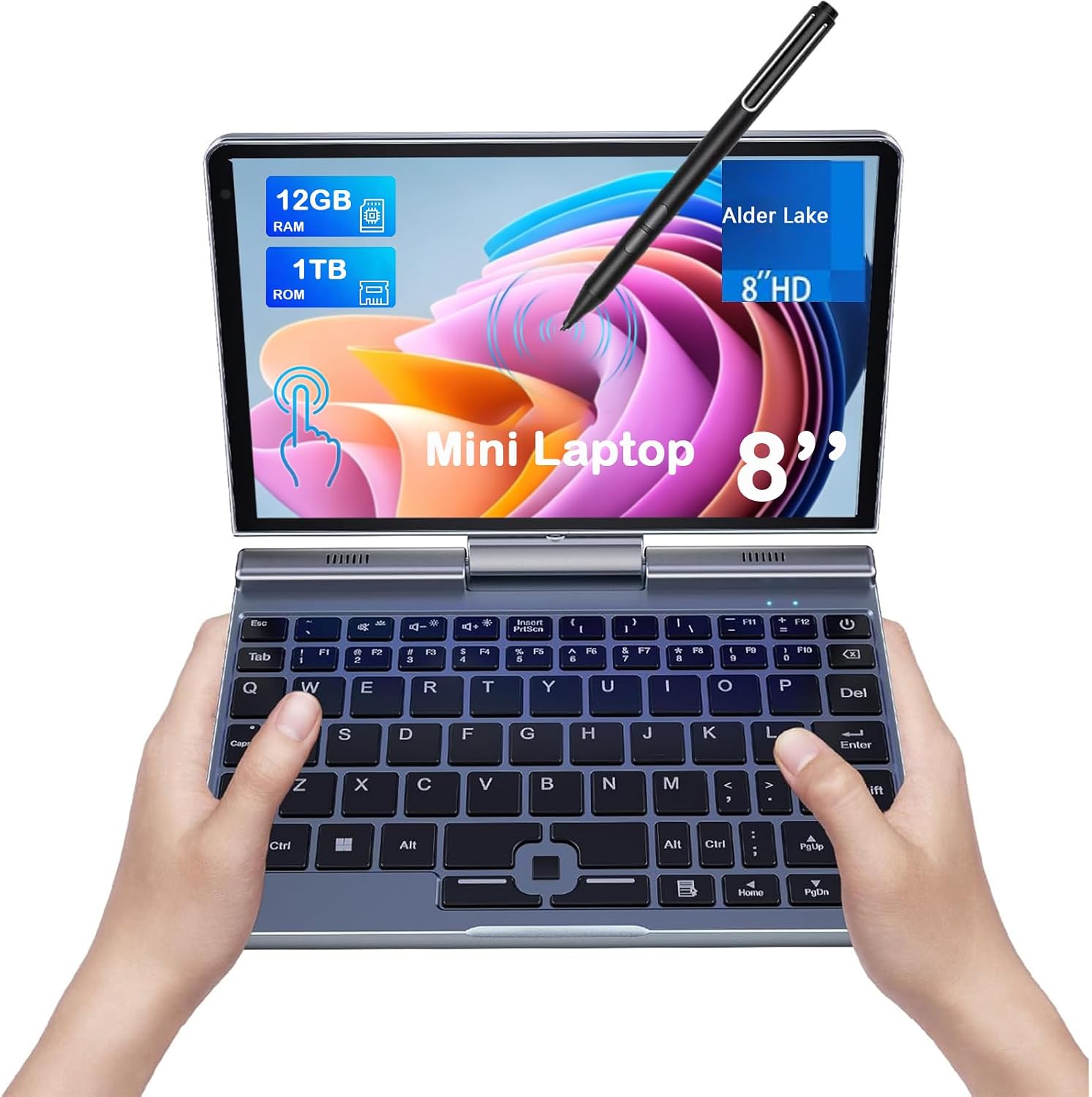
Vendor product image (KOOSMILE Amazon listing).
Is this your machine? It sells as KOOSMILE 8” Mini Laptop (Amazon), KOOFORWAY 8 inch Mini Laptop (kooforway.com), and as unbranded “Mini Laptop 8 inch N150 Touchscreen 2 in 1 / Pocket PC” listings on Amazon and AliExpress; the chassis family — “P8” — also includes earlier Intel N100 units sold as Topton, Crelander and Aslay. You can recognize it by: BIOS version GLF-BI-8-S8_AN_G04R100-F70A-015-A, every DMI/SMBIOS identity field reading “To be filled by O.E.M.”, a battery calling itself SR Real Battery, an 8-inch 1280×800 portrait-native DSI panel, and the dual-axis double hinge. If that matches, everything below — including the fixes — applies to your device.
Specs
As read from the machine itself (PCI/USB IDs included deliberately — with the DMI fields blank, they’re the only searchable identity this device has; vendor-sheet figures marked as such):
| SoC | Intel N150 (Alder Lake-N / “Twin Lake”), 4 cores / 4 threads, 0.7–3.6 GHz¹ |
| Memory | 12 GB LPDDR5, soldered (11.4 GiB usable)² |
| Display | 8.0″ 1280×800 IPS touch — portrait-native DSI panel without EDID (see review) |
| Storage | 1 TB M.2 2242 B-key SSD² — shipped drive is SATA (hdparm -t ≈ 468 MB/s) |
| GPU | Intel UHD Graphics, Alder Lake-N (8086:46d4) |
| Wi-Fi | Intel Wi-Fi 6 AX101, CNVi (8086:54f0) |
| Bluetooth | 5.2 — Intel AX201 (USB 8087:0026) |
| Ethernet | Realtek RTL8111/8168 PCIe Gigabit (10ec:8168); RJ45 on the back — no link/activity LEDs |
| Audio | Intel HD Audio (8086:54c8), stereo speakers, built-in microphone (works fine, decent quality) |
| Camera | 2 MP / 1080p — “icSpring” (USB 32e6:9005) |
| Input | Backlit condensed keyboard + optical touch sensor (SINO WEALTH, USB 258a:0131); Elan touchscreen (04f3:2f33); pen; MXC6655 accelerometer |
| Battery | 36.48 Wh design (3-cell, 3200 mAh) — as reported by a placeholder gauge, see review |
| Ports | 1× USB-A (USB 3), 1× USB-C (PD 30 W in; USB 2/3 data, DP alt mode untested), 1× full-size HDMI out, 1× Gigabit RJ45 (rear, no LEDs), 3.5 mm headset jack (stereo + mic) |
| Dimensions / weight | 198 × 138 × 19.8 mm, 0.78 kg (vendor figures) |
| Firmware | BIOS GLF-BI-8-S8_AN_G04R100-F70A-015-A (2025-04-22); every DMI identity field “To be filled by O.E.M.”; SMBIOS chassis type: “Desktop” |
| OS (shipped) | Windows 11 Pro |
¹ 3.6 GHz is single-core burst only; the fused all-core ceiling is 2.9 GHz, and this unit sustains ~2.2 GHz — see the review.
² Also sold with less RAM and smaller SSDs; the 12 GB / 1 TB configuration reviewed here was — and probably still is — the top of the family.
The fixes (start here if you own one)
This repository doubles as the companion repo for the review below. If you
own this machine — sold as KOOSMILE and KOOFORWAY, and as unbranded 8-inch
N150 convertibles with the identical spec sheet — the runtime fixes that make
Linux behave live in fixes/:
| Problem | Fix | How to apply |
|---|---|---|
DPTF fan ACPI broken: kernel error spam, sensors/hwmon hangs, no fan speed |
fixes/acpi-fix/ — SSDT that maps the missing CFSP field onto the fan tach found in EC RAM |
sudo ./1-dump-tables.sh → ./2-build-fix.sh → sudo ./3-install.sh live to test now, then uki (mkinitcpio-built UKIs) or initrd (explicit boot entries) for persistence — details in its README |
| No tablet-mode switch device (no VBTN/INT33D6) | fixes/tablet-mode-orientation/intel-hid.conf |
copy to /etc/modprobe.d/, regenerate the initramfs |
| Portrait DSI panel without EDID: wrong console/desktop orientation | kernel command line | add fbcon=rotate:1 video=DSI-1:panel_orientation=right_side_up |
| mutter loses orientation on tablet→laptop transitions; on-screen keyboard unreliable | fixes/tablet-mode-orientation/ — switch-watching handler + idempotent enforcement helper |
tablet-mode-handler → /usr/local/bin/, restore.py → /usr/local/lib/tablet-orientation/, the .service → /etc/systemd/system/, then systemctl enable --now tablet-mode-handler (needs evtest) |
| Unattended battery drain; EC hard-cutoff fires at a lying gauge percentage | fixes/sleep-ladder/ — battery-idle sleep ladder (blank → s2idle → deep S3 → hibernate) with a debounced terminal-voltage emergency hibernate |
progressive-sleep → /usr/local/bin/, the .service → /etc/systemd/system/, then systemctl enable --now progressive-sleep (assumes a working hibernate/resume setup; tune thresholds via the env vars in the unit) |
Everything was developed and verified on the reviewed unit (and, where noted, reproduced on a second identical one). The review below explains why each of these is necessary.
Other owners have walked this road and published fixes of their own — worth knowing as corroboration and complement: Breczek/kooforway-linux-fixes targets the same Kooforway under Fedora/GNOME with a libinput calibration matrix for the rotated ELAN 04f3:2f33 stylus axes and an accelerometer rotation listener (independently confirming GNOME won’t rotate this panel unassisted), and nbailey.ca’s P8 post carries the GRUB/GDM/libinput rotation recipes for the family’s earlier N100 generation.
I finally found a small convertible laptop (8”) with decent I/O and RAM, even a backlit keyboard — genuinely needed, because after four months I still haven’t entirely internalized the extra-weird condensed layout into muscle memory. Obviously I’d run Linux on it. I tried Debian first, then Arch — though not, it turns out, on the same machine. A friend found the first unit about four months ago and wanted Debian 13 on it; setting that up, I liked the hardware enough that two months later I had an identical one of my own, running Arch. Mine is the machine I travel with, and the one this review is typed on. The thermal, battery and firmware measurements in this post were all made on my own unit; the display and tablet-mode workarounds were first worked out on the friend’s — and reproduced identically on mine, so none of this is a one-bad-unit anecdote. It’s the product. And the story of this product is not the spec sheet; it’s the gap between the spec sheet and what the firmware actually lets the hardware do.
Short version: the chassis is a small miracle. The firmware is Intel’s reference code for a desktop mini-PC, shipped in a battery-powered convertible with the serial numbers not so much filed off as never filled in. Four months of living with it — and, eventually, fixing part of it myself — follow.
The shape nobody mainstream will make
Credit where due: this form factor is wonderful, and no mainstream vendor makes it. An aluminum 8-inch 2-in-1 the size of a paperback, with a double hinge working on two different axes — one opens the clamshell flat to 180 degrees, the other flips the display over on itself; a mechanism rarer today than even the ubiquitous Yoga-style 360° fold — plus a real (if thumb-sized) keyboard, pen and touch input, an accelerometer for rotation, and a port cluster genuinely rare at this size: a USB 3 Type-A, USB-C with 30 W PD charging, full-size HDMI out, even a Gigabit RJ45 (LED-less, tucked on the back), and a 3.5 mm headset jack. Wi-Fi 6. A user-replaceable M.2 2242 SSD — though the shipped drive is a SATA device, not PCIe/NVMe: hdparm -t clocks it at ~468 MB/s, it introduces itself as, literally, “M.2 SSD 1TB” (no brand, in keeping with house style), and whether the slot itself would carry an NVMe drive is untested. The second, empty AHCI port ships firmware-locked in a way that silently defeats TLP’s SATA link-power setting for the real drive until you denylist it. (No microSD slot either — genuinely annoying on a machine this pocketable — and no fingerprint reader.) And that backlit keyboard — an outright rarity at this size, and the difference between usable and useless in a dim room when your fingers still haven’t memorized where the vendor hid the apostrophe.
It slips into a coat pocket. Flip the display over the keyboard and it’s a tablet for reading; flip the display while the base sits flat on a table and it’s its own stand for video. A word about weight, though: this is a small machine, not a light one — pocketable but dense, roughly two iPad minis in tablet mode. For perspective, the 11-inch Chromebook Duet’s tablet half weighs 500 g — less than this entire 8-inch clamshell (0.78 kg by the vendor’s own sheet) — and even the Duet’s complete kit with keyboard and folio stand is only 874 g. The heft is the x86 tax made physical: a fan assembly, plus a battery sized to feed ~12 W of platform draw. The ARM section below puts numbers on it. When The Gadgeteer reviewed the rival X-Plus Piccolo they called it “a love letter to the netbook days,” and the phrase fits this whole resurgent class. That two vendors are independently building 8-inch aluminum 2-in-1s again is itself the good news.
This chassis deserves to exist. It deserved better than what was put inside it.
What $499 buys
The machine: an Intel N150 (Alder Lake-N/Twin Lake, four E-cores), 12 GB LPDDR5, 1 TB SSD, an 800×1280 touch panel, a 36.48 Wh battery, Windows 11 Pro preinstalled — $499 as configured. It’s sold as KOOSMILE on Amazon and direct from Kooforway, and spec-identical unbranded listings (same 8” N150, 12 GB, G-sensor, 2 MP camera, 30 W PD, stylus) float around Amazon (B0F9YV1FGW, B0F9YZ159H, B0F9YWW1VD) and AliExpress (3256808424853779) — almost certainly the same unit wearing different stickers.
Who actually makes it? The BIOS splash screen says “Kooforway” — a strong hint that Kooforway is the ODM rather than another rebrander, with KOOSMILE as a retail channel. That attribution matters: the firmware neglect documented below would then be their own work, not something they bought in blind. The BIOS identifies itself as GLF-BI-8-S8_AN_G04R100-F70A-015-A, dated 2025-04-22 — a string with zero public search hits as of this writing. I’m publishing it deliberately: if you’re eyeing some other 8-inch N150 convertible and its BIOS string starts with GLF-BI-8-S8, you’re reading a review of your machine.
The family is also older than this generation: an Intel N100 version of the same chassis — known as the “P8” and sold as Topton, Crelander and Aslay — was reviewed running Linux by nbailey.ca in March 2025: same condensed keyboard, same built-in Ethernet, same portrait-panel rotation gauntlet. This is a lineage, not a one-off.
One clarification, because the two get conflated: the X-Plus “Piccolo” (reviewed by The Gadgeteer, covered by Liliputing) shares the pocket size and much of the spec sheet, but it is a distinct competing product, not a rebrand — different panel (1920×1200 vs this unit’s 800×1280), different battery (25.9 Wh vs 36.48 Wh), different chassis (658 g, and a conventional 360-degree convertible fold per its reviews, not this unit’s dual-axis double hinge). That said, the breed seems to share its firmware culture: even the Piccolo drew a Liliputing commenter’s verdict of “cannot run Linux, like, at all — the display output just doesn’t work.” Mine can, with work. Out of the box, that diagnosis is understandable.
What’s actually inside: Intel’s reference firmware, barely adapted
Strip the marketing and what ships is essentially Intel’s reference firmware for a NUC-style mini-PC, minimally adapted to a battery-powered convertible. That is not rhetoric; the firmware says so itself, repeatedly, in its own words:
- Every DMI identity field literally reads “To be filled by O.E.M.” — vendor, product name, version, board name. The machine does not know what it is. This sounds cosmetic and is anything but: no OS quirk (kernel or userspace hwdb) can ever target a machine with blank identity strings, and finding a BIOS update is effectively impossible because there is no product name to search for.
- The battery gauge reports Intel’s reference-firmware placeholders. The OS sees
MODEL_NAME=SR Real Battery,MANUFACTURER=Intel SR 1, serial123456789, technology “Unknown”, cycle count 0 forever.ENERGY_FULLis hardwired equal to design capacity, so the pack’s aging is invisible by construction — the reported percentage quietly loses meaning over the device’s life. - The ACPI thermal model is a desktop NUC’s. The ACPI thermal zone always reads 0 °C, yet defines active-cooling fan trips at 40/45/50/55 °C — a desktop fan-curve layout that, fed a constant zero, can never fire. It declares five always-on ACPI fan devices for a machine with one fan. And Intel’s stock USB table ships verbatim (OEM ID still “INTEL”, table ID
xh_adl_N), referencing the Type-C/USB4 subsystem that N-series silicon doesn’t even have — two ACPI errors at every single boot, from hardware that was never there. - The thermal stack reads a fan-speed register that doesn’t exist. Intel’s reference DPTF code — shipped here wholesale — asks the embedded controller for its fan speed through a field called
CFSPthat the vendor’s EC firmware never implements. It’s declared as an external reference and defined in none of the twenty ACPI tables the machine loads. The fan-status method therefore aborts on every call: permanent error spam in the kernel log, dead fan telemetry, and fan sysfs reads that hang for minutes, wedging any monitoring tool that walks hwmon. The fan only spins because the EC drives it autonomously, blind to the thermal-policy layer above it. (I eventually fixed this one myself — story below.) - Package C-states are locked off. The BIOS sets the package C-state limit to PC0 — the deepest package sleep permitted is “fully awake” — and sets the lock bit, so no OS can ever change it (
MSR_PKG_CST_CONFIG_CONTROL = 0x8000). Measured consequence: 0.00 % S0ix residency across a complete suspend-to-idle cycle. “Suspend” on this machine parks the cores and leaves the package running. On a desktop NUC that’s a defensible latency tweak; on a battery-powered convertible it is disqualifying — and locked. - It tells the operating system it’s a desktop. The SMBIOS chassis-type field — the one byte that says “I am a convertible” — reads 3, “Desktop”. Direct casualty: Linux’s virtual-button driver refuses to offer a tablet-mode switch on a machine that claims to be a desktop, so the convertible’s working hinge detection (the EC dutifully fires notify events on fold-over) is thrown away one layer up. This is the pattern everywhere on this machine: functioning hardware, sabotaged by identification fields nobody filled in.
- The panel ships without EDID or orientation data. It’s a portrait 800×1280 DSI panel mounted landscape; every OS layer has to be told individually which way is up, and because the DMI strings are blank, an upstream kernel quirk can never be added for it. There’s no tablet-mode switch device in ACPI either. For fairness, one genuinely correct piece: the accelerometer’s ACPI description carries a proper mount matrix that the kernel driver consumes — though the sensor itself reads about 1.47 g at rest, which is physically impossible for a stationary object and suggests a gross scale misconfiguration. Harmless for rotation detection (that’s sign-based), but don’t build a seismometer on it.
The vendor’s Windows 11 image papers over these gaps with OS-level workarounds. On any other OS, each one has to be rediscovered and reproduced by hand. I know, because I did.
The number on the box does not exist
Marketing says 3.6 GHz. Here is what the silicon and firmware actually permit, measured under sustained four-core load with turbostat:
- The fused turbo table caps all-core at 2.9 GHz. The ratio limits read 3.6 GHz for one core, 3.4 for two, 3.1 for three, 2.9 for four. The advertised 3.6 GHz exists only as a single-core burst; “maximum frequency under full load” is impossible on this silicon by design — any N150, anywhere.
- The firmware throttles at 80 °C and locks it. The temperature-target MSR sets a 25 °C offset below the silicon’s 105 °C limit, with the lock bit set. The kernel’s TCC driver refuses with “TCC Offset locked”; no software can restore the headroom. A quarter of the chip’s thermal margin, discarded by fiat.
- The cooler dissipates about 9.5 W at full fan — below even the 12 W sustained power limit the firmware itself configures. Under load the package rides the 80 °C wall at 9.5 W, racking up 130–160 hardware throttle events per second. Raising the power limits to 15/25 W changed the sustained clock from 2188 to 2199 MHz — noise. Cooling capacity, not power budget, is the binding constraint.
Net result: ~2.2 GHz sustained all-core at 99.8 % utilization, with the fan audible the whole time. That’s 24 % below the fused ceiling and 39 % below the number on the box. The three limits compound cruelly: a perfect repaste can only ever claw back to 2.9 GHz, because the locked 80 °C cap wastes whatever margin a better cooler would add.
The battery gauge is a prop
Because the gauge is a placeholder (see above), honest battery numbers required building my own telemetry: roughly 43,000 power-draw samples collected from the power daemon’s logging spanning June 3 to August 10, 2026 — two months of real use, at home and on the road — now supplemented by a persistent one-sample-per-minute logger. The numbers below are from the verified analysis pass of 2026-08-11:
- Median on-battery platform draw is 11.7 W (11.1 W on the strictest clean subset), even with an aggressively tuned power configuration. That’s a phone-SoC-class chassis burning ultrabook-class power. Implied real-world runtime from the 36.48 Wh label: about 3.1 hours of mixed use. The 25th-percentile draw of 8.1 W stretches that to ~4.5 hours if you’re gentle.
- The best fully-recorded discharge delivered at least 28 Wh (a lower bound — the logged data has gaps) against the 36.48 Wh label. The label itself can’t be verified from the gauge, because the gauge reports
energy_nowas exactly capacity-percent times design capacity — over 641 calibration rows the deviation never exceeded 0.001 Wh. There is one real signal in there, and it isn’t energy. - The EC’s hard power-cutoff is load-dependent and inconsistent. Observed: death at 9.1 V with the gauge showing “20 %” under a ~44 W transient load, versus death at 10.38 V showing “2 %” under a ~5 W light load. The percentage is not a usable low-battery signal — only terminal voltage is. My machine now runs a debounced voltage-floor emergency hibernate at 10.8 V, which most recently saved it on the evening of 2026-08-10.
- The idle floor is the C-state lock made visible. Watching live power draw: the package floors at ~3 W at idle — a healthy chip of this class package-idles well below 1 W — and steps to ~10 W the instant anything runs. With package C-states locked to PC0, the uncore, fabric and display engine never gate, awake or “asleep”: suspend-to-idle measured 0.00 % low-power-idle residency, and sleeping overnight costs real battery. There’s a fine irony in the AC-side tuning here: race-to-idle strategy — sprint at full clock, then sleep — only pays when idle is cheap. This firmware sprints at 10 W toward an idle state it has forbidden itself from ever entering.
- Charging is the one bright spot: about 60 % per hour over USB-C PD, roughly 1.7 hours for a full charge from any compliant charger.
Living with it on Linux
Everything above had to be discovered before it could be worked around. The current stack, condensed (full write-ups, scripts and services are in the companion repository):
| Firmware gap | Workaround |
|---|---|
| No tablet-mode switch device in ACPI | intel_hid enable_sw_tablet_mode=2 module parameter — the EC’s hinge events are real; this surfaces them |
| Portrait panel, no EDID, no orientation data | fbcon=rotate:1 plus video=DSI-1:panel_orientation=right_side_up on the kernel command line |
| Compositor loses orientation on tablet→laptop transitions | A watchdog service that re-enforces landscape via the compositor’s D-Bus API, idempotently |
| On-screen keyboard unreliable in user sessions | The same handler toggles the OSK per mode; a shell extension covers terminal apps |
| No sane AC/battery power policy | TLP drop-in tuning EPP, ASPM, iGPU clamps, USB/PCIe runtime PM |
| Firmware-locked AHCI port breaks SATA power setting | Deny-listed for link power management |
| Static power limits | A udev-driven RAPL switcher: raised limits on AC, OEM defaults on battery |
| Locked 80 °C throttle, weak cooler | Nothing possible in software |
| Locked PC0, no S0ix | Nothing possible in software; progressive sleep escalation to hibernate instead |
Phantom EC fan register (CFSP) |
A stub SSDT loaded from the initramfs, later upgraded to read the EC’s real tachometer — see below |
Each row is an evening or three. The display and tablet-mode rows were fought through first on the friend’s Debian unit and replayed on mine without modification — reproducibility a lab would envy, for defects a lab should have caught. The last row was a small war, and I want to tell it properly, because it ends with something I didn’t expect: me shipping the vendor a firmware fix.
The phantom register
From the very first boot, the kernel log was carpeted with this:
ACPI BIOS Error (bug): Could not resolve symbol [\_SB.PC00.LPCB.HEC.CFSP], AE_NOT_FOUND
ACPI Error: Aborting method \_SB.PC00.LPCB.H_EC.TFN1._FST due to previous error
Beyond the spam, the practical damage: the fan-status method aborts on every call, so fan telemetry is dead, and — much worse — reading the fan’s hwmon or cooling-device files hangs for minutes, which wedges sensors, btop, and anything else that innocently walks sysfs.
Theory one wrote itself: look at the error. The code says HEC, the device is declared H_EC — obviously someone did a half-finished rename of the reference code, and the fix is a rename override. Theory two, after that didn’t survive contact with the disassembly: maybe two different generations of Intel reference code were mixed, one expecting each name. Both wrong. The truth required dumping all twenty ACPI tables — including the six dynamically-loaded ones, which turn out to be innocent CPU power-management tables — and byte-searching them: no HEC name segment exists in any loaded table. The kernel’s “HEC” spelling is an artifact of ACPICA’s error printer rendering H_EC. I lost real days to trusting an error message’s spelling.
The actual bug is dumber and worse: the DPTF fan code reads the EC field CFSP — declared as an external reference, defined nowhere. Intel’s reference thermal stack shipped wired to an EC interface that this vendor’s EC firmware simply never implements. It cannot ever have worked, on any unit, under any OS. Nobody at the factory looked at a kernel log even once.
The first fix was almost anticlimactic: a stub SSDT defining CFSP = 0 so the method completes (fan speed reads as a placeholder 0 for the moment — the EC drives the fan autonomously, so the bug only ever cost observability). The build script re-verifies the diagnosis against a fresh table dump and refuses to build if it ever finds a real CFSP definition. Delivery was the fun part: first live-loaded through configfs for a no-reboot test, then made persistent via a small mkinitcpio hook that embeds the override table into the early cpio inside every Unified Kernel Image — surviving kernel updates, re-signed for Secure Boot each time. Reboot-verified on 2026-08-12: the stub table loads 0.012 seconds into boot, zero CFSP errors across the entire log for the first time in this machine’s life, and fan sysfs reads return instantly. The only ACPI errors left are the two from Intel’s verbatim USB table probing for Type-C hardware this chip has never had — deliberately not stubbed, because faking USB ports to silence two boot lines is a bad trade.
That should have been the end: errors gone, hwmon unwedged, fan speed politely reading 0. But a zero next to an audibly spinning fan nags. The EC never implements the field Intel’s code reads — fine — but the EC obviously knows the fan speed, because it’s the thing driving the fan. So I went looking for the real signal. Using the kernel’s read-only ec_sys debugfs interface, I sampled all 256 bytes of EC RAM once per second through a scripted idle → four-core-load → cooldown cycle — 195 samples, logged alongside the package temperature — and looked for anything that moved like a fan. Something did: a little-endian 16-bit word at offset 0x8D/0x8E, sitting around 430–490 at idle, ramping to ~1100 under load, decaying smoothly through cooldown — and visibly chasing a soft-ramp fan target at 0xA1/0xA2 that steps in perfect increments of 10. (The scan also turned up EC copies of the CPU temperature at 0x70/0x71 and slower board sensors at 0x62/0x72/0x73. The EC is quietly competent; nobody upstairs ever asked it anything.)
So the stub got a promotion: CFSP is no longer a constant 0 but a real 16-bit field into the EC’s operation region at offset 0x8D. Rebuilt into the UKIs, rebooted, verified: still zero ACPI errors across the entire boot, and sensors now reports live fan speed — 449 at idle, climbing with the audible fan. One honest caveat: I don’t know the unit. Plausibly RPM, possibly a scaled tach count; what matters is that it’s monotone with the actual fan. The vendor shipped Intel’s thermal stack wired to an EC interface nobody ever implemented; this machine now reports genuine fan telemetry through that very plumbing, because a customer finished the wiring for them.
I bought a $499 laptop and ended up authoring the firmware patch its vendor never wrote. I’d call that a strange definition of “included accessories,” but honestly, it was the most fun I’ve had with this machine.
This should have been an ARM machine
Step back from the individual defects and notice where they all live: SMBIOS identity strings, ACPI bytecode, a discrete embedded controller running a proprietary blob, DPTF, VBT tables, locked MSRs — the whole 1980s-lineage “rich BIOS plus EC” architecture that x86 drags behind it, in which a small ODM has a thousand opportunities to leave reference scaffolding in place. This one took most of them. The N150 itself is blameless silicon; the platform around it is an integration exam the vendor failed.
A modern ARM tablet SoC deletes most of that exam. Identity, thermal behavior, panel description and charging live in a device tree the silicon vendor already validated — and while a device tree can lie about identity too — plenty of retail ARM hardware boots a copy-pasted reference-board compatible, and out-of-tree trees sometimes carry no usable model string at all — it cannot say nothing: the name selects the description the kernel boots by (thermal zones, panel, gauge), so even a vendor who phones in the identity has had to make the description work. This machine demonstrates the opposite: hardware that runs fine while every layer describing it is blank or wrong. To check that this isn’t just theory, I compared against ARM silicon that was mass-produced and in retail devices in the same window this machine shipped (the N150 launched at CES in January 2025; this unit’s BIOS is dated April 2025, on sale around June):
| This device (N150) | Kompanio 838 — Lenovo Duet 11 | Kompanio Ultra 910 — Lenovo CB+ 14 | Snapdragon X X1-26-100 | |
|---|---|---|---|---|
| In market | ~June 2025 ($499) | Nov 2024 (€320–450) | announced Mar 2025, retail Jun–Aug 2025 ($749) | CES Jan 2025, $600-class laptops |
| Form | 8” convertible, fan | 11” detachable, fanless | 14” OLED laptop, fanless | 13–15” laptops |
| GB6 single / multi | ~1,258 / ~3,010 rated (nanoreview); sustains 2.2 of 2.9 GHz all-core here | 1,003 / 2,291 | 2,535 / 7,659 | ~2,120 / ~10,339 (nanoreview) |
| Battery | 36.48 Wh → ~3.1 h measured median | 29 Wh → ~11–12 h measured | 60 Wh → 14.6–15+ h measured | (class: 15–20 h) |
| Runtime per Wh | 0.085 h/Wh | ~0.40 h/Wh | ~0.25 h/Wh (14” OLED!) | — |
| Weight | ~0.7 kg class (competitor: 658 g) | 500 g tablet / 874 g with kbd+stand | 1.17 kg (14”) | — |
Read that table slowly. At the same price, the Kompanio 838 Duet delivers the multicore throughput this box actually sustains — from a fanless 500 g tablet running 11–12 hours on a smaller battery behind a larger, sharper display. Per watt-hour it goes about 4.7× further; this machine’s locked 3 W package-idle floor alone exceeds the Duet’s entire average draw. On the same shelf a tier up, the MediaTek Kompanio Ultra 910’s Cortex-X925 sustains 3.62 GHz fanless — the number printed on this machine’s box, which its own silicon can only burst to — at twice the single-core and two-and-a-half times the multi-core score, in silence. And even keeping Windows, the Snapdragon X was announced at the very CES where the N150 launched, aimed at the same $600 shelf, at ~1.7× single and ~3.4× multi.
Two honest caveats, because the comparison is otherwise too easy:
- x86 Windows is the product. This thing ships Windows 11 Pro; that’s the entire pitch of a $499 pocket PC. Kompanio means ChromeOS or Linux; Snapdragon X means Windows-on-ARM with emulation for the x86 tail. But for the audience of this review — people who put Linux on it — the trade inverts completely: mainline device-tree support beats reverse-engineering a broken ACPI stack every single time.
- Silicon access, not physics, picked this chip. Intel hands any small ODM a complete reference design — this firmware is the proof; it still says so. MediaTek sells Kompanio Ultra to the Lenovo/Acer/HP tier, not in tray quantities to a small Shenzhen ODM, and the ARM parts such an ODM can buy freely lose to the N150 on raw CPU. The N150 was the best chip available to this vendor — just not the best chip for this device.
Also fair: ARM-land has firmware sins of its own — vendor BSP kernels, GPU blobs, out-of-tree device trees on no-name tablets. But Chromebook-class SoCs ship mainline support as a platform requirement, and the specific category of defect that defines this machine — identity placeholders silently breaking every quirk-matching system downstream — structurally cannot happen where identity is load-bearing.
As delivered, native x86 is the only thing this firmware provides, and it provides it while misreporting the battery, throttling the CPU a gigahertz under its own ceiling, forbidding sleep, and wearing a name tag that reads “To be filled by O.E.M.”
Verdict
Love the chassis, don’t trust the firmware. The hardware genuinely delivers something no mainstream vendor offers: a pocketable aluminum convertible with real ports, a real keyboard (backlit!), and a serviceable SSD. If you want this shape badly enough to do firmware archaeology — dumping ACPI tables, building your own battery telemetry, shipping yourself the fixes the vendor didn’t — it will reward you, in its way. I clearly did, and it clearly has.
Everyone else should skip it. The advertised clock is unreachable by design. The battery gauge is a stage prop that gets less truthful as the pack ages. Real-world runtime is about three hours. Sleep doesn’t sleep. The machine can never be matched by an OS quirk or found by a BIOS update, because it doesn’t know its own name. And the vendor’s Windows image is best understood as a patch kit for the vendor’s own firmware.
If someone builds this exact chassis around a modern MediaTek, Qualcomm or Samsung tablet-class SoC, buy it on day one — I will. This one, as shipped, is a reference design wearing a very charming coat.
FAQ
Does the KOOSMILE / Kooforway 8-inch N150 mini laptop run Linux?
Yes — well, after the workarounds in fixes/ and the kernel command line described above. Out of the box the display comes up sideways and the console is unusable, which is why owners conclude it “cannot run Linux.” It can; it just doesn’t want to.
Why does the screen come up rotated / portrait under Linux?
The panel is portrait-native (800×1280) with no EDID and no orientation info anywhere. Add fbcon=rotate:1 video=DSI-1:panel_orientation=right_side_up to the kernel command line; for GNOME auto-rotation and tablet mode, install the handler in fixes/tablet-mode-orientation/.
Why do sensors, btop or hwmon tools hang for minutes?
The firmware’s DPTF fan code reads an EC field that doesn’t exist, so the ACPI fan-status method aborts and its sysfs reads hang. The fix — an SSDT loaded from the initramfs that maps the field onto the fan tachometer we found in EC RAM — is in fixes/acpi-fix/, and it also gives you a real fan-speed reading.
Why is battery life only ~3 hours?
Median platform draw is ~11.7 W: the BIOS locks package C-states to PC0 (so the package can never idle and S0ix/modern standby is impossible — measured 0.00 % residency) on top of x86 overheads. Nothing can unlock it in software. The sleep ladder in fixes/sleep-ladder/ keeps unattended drain survivable.
Why doesn’t the battery percentage warn before it dies?
The gauge is an Intel reference-firmware placeholder (energy_now is literally percent × design capacity) and the EC’s hard cutoff is load-dependent — observed dying at a displayed “20 %”. Trust terminal voltage only; the sleep ladder includes a debounced voltage-floor emergency hibernate.
Can I upgrade the SSD? It’s a user-replaceable M.2 2242 (B-key per the vendor sheet). The shipped 1 TB drive is SATA (~468 MB/s); whether the slot also carries NVMe is untested.
Does the CPU really run at 3.6 GHz? Single-core bursts only. The fused all-core limit is 2.9 GHz, the firmware locks the thermal throttle at 80 °C, and the cooler sheds ~9.5 W — sustained all-core is ~2.2 GHz.
The ACPI table dumps from the reviewed unit are in fixes/acpi-fix/tables/, the stub-SSDT fix and the EC-RAM fan-hunt script (with its captured samples) in fixes/acpi-fix/, and the battery-telemetry logger in data/battery-telemetry/. The raw timestamped battery logs themselves stay private — two months of power draw is also a map of someone’s days — but the logger reproduces the dataset on any unit, and every aggregate that matters is quoted above.